

Switch Account
Switch to Student Account
-
Teachers are able to use Student View to experience SLS as a student. Teacher View and Student View are not dependent on each other.
-
Open the right menu and click Switch to Student Account.
-
Alternatively, enter a Student Group or a Professional Development Group and click Switch to Student Account.
-
You can add your teacher-student account into a Class Group to attempt Assignments as a student. To find out more on how you can add a teacher-student account into a Class Group, click here.
Switch to Teacher Account
-
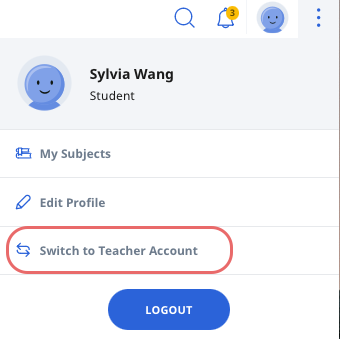
In your teacher-student account, open the right menu and click Switch to Teacher Account.
-
-
Alternatively, enter a Student Group or a Professional Development Group and click Switch to Teacher Account.
-
You will be prompted to log in with MIMS or with your SLS password.