

View My Drive
View My Drive
Search in My Modules
-
Open the left menu from the header on the homepage. Click Resources, followed by My Drive. By default, you will be in the My Modules tab.
-
To search for the Resources under the My Modules tab, enter your search term(s) in the Search My Modules search bar
-
Press "Enter" to view your search results.
-
Results to the search term(s) will be listed. You can sort by Title, Type, and Last Modified through the header.
-
For Resources under My Modules tab, click the Overflow (3-dot icon) to Share, Make a Copy, Set as Template, Move, Move to Trash or View Details. You can only share or make a copy of the Resource if the permission settings have been enabled.
Search in Trash
-
Open the left menu from the header on the homepage. Click Resources, followed by My Drive. By default, you will be in the My Modules tab.
-
Click the Trash tab.
-
To search for Resources in Trash, enter your search term(s) in the Search Trash search bar.
-
Press "Enter" to view your search results.
-
Results to the search term(s) will be listed. You can sort the Title, Location, Type, and Deleted date through the header.
-
For Trash, click the Overflow (3-dot icon) to Restore or Delete Forever.
View Modules Shared with Me
Modules shared with you can be accessed from My Drive.
-
Open the left menu from the header on the homepage. Click Resources, followed by My Drive. By default, you will be in the My Modules tab.
-
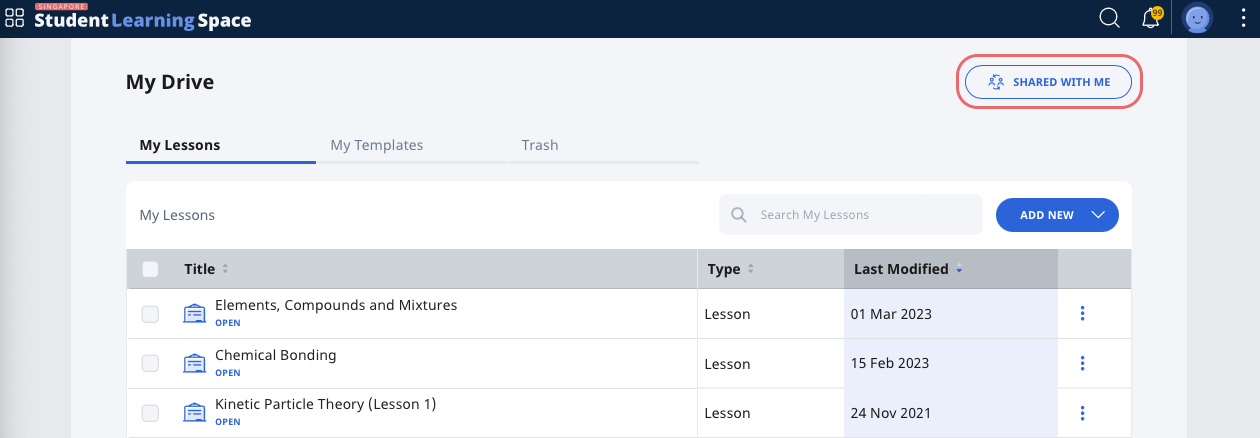
To view the Modules teachers have shared with you, click Shared With Me.
-
To search for Modules shared with you, enter your search term(s) in the Search Shared With Me search bar.
-
Press "Enter" to view your search results.
-
Results to the search term(s) will be listed. You can sort by Title, Type, Last Modified and Owner through the header.
-
For Modules in the Shared With Me page, click the Overflow (3-dot icon) to Make a Copy or View Details.
Note: You can only copy a Module if permission has been granted by the Module Owner. -
To return to My Drive, click My Drive.
Delete a Shared Module
Important: This only removes the module from your Shared with Me page and does not remove the module from the teacher who shared it with you.
-
To delete a shared Module, in the Shared with Me page, open the Module.
-
Open the right menu and select Share with Teachers.
-
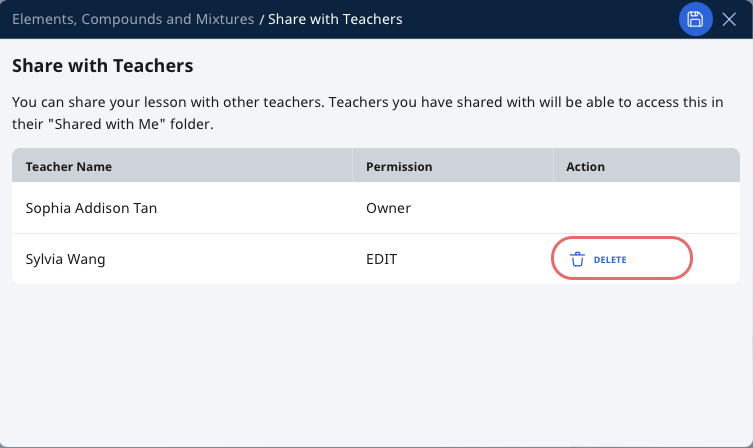
Find your name in the Share with Teachers subpage and click Delete.
-
Click Save to confirm the changes.
-
The shared Module will no longer be visible under your Shared with Me page.